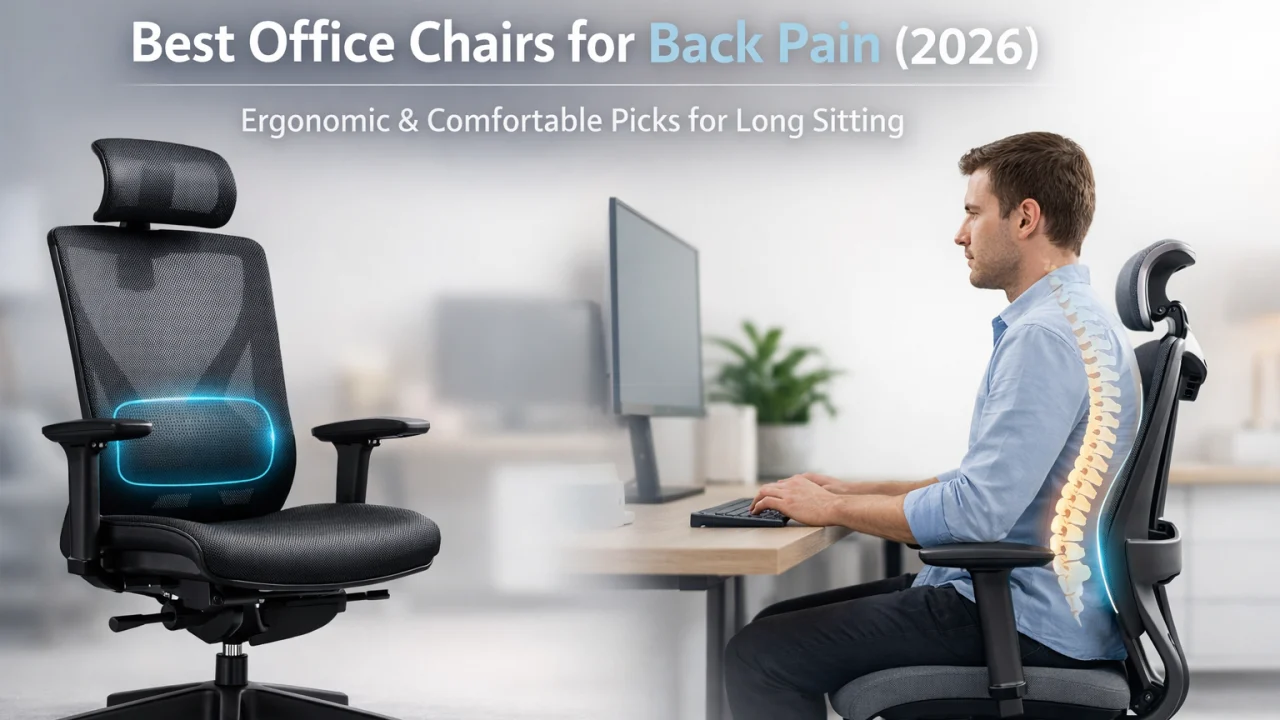
Best Office Chairs for Back Pain (2026)
Ergonomic picks that actually fix your posture — for every budget
⏱️ 15 min read
🪑 11 Chairs Reviewed
💰 All Budgets Covered
If your back aches after a long day at your desk, you are absolutely not alone. Millions of desk workers deal with lower back pain every single day — and the culprit is almost always the chair they sit in for 8+ hours straight. A bad chair puts your spine in an unnatural position, strains the muscles around it, and slowly but surely turns “a little soreness” into a chronic problem.
The good news? The right ergonomic office chair can make a dramatic difference. We’re not talking about a magic cure — but a well-designed chair that supports your lower back, keeps your hips at the right angle, and lets you adjust it to your exact body shape can genuinely reduce pain, improve focus, and make those long work sessions feel far less brutal.
We’ve dug deep into expert ergonomic research, hands-on reviews, and real user feedback from communities like Reddit’s r/OfficeChairs and r/Ergonomics to bring you the most thorough guide to the best office chairs for back pain in 2026. Whether you’re on a tight budget or ready to invest in a premium chair that lasts 20 years, there’s a perfect pick on this list for you.
⚡ Quick Picks — Top Office Chairs for Back Pain 2026
- 🥇 Best Overall: Branch Ergonomic Chair Pro — 14 adjustment points, padded lumbar, great value at ~$700
- 🥈 Best Premium: Herman Miller Aeron — iconic mesh chair with PostureFit SL sacral support
- 🥉 Best for Gamers: Secretlab Titan Evo — dual lumbar dials, 4D arms, supremely comfortable
- 💰 Best Budget: Sihoo M18 — dual-adjustable lumbar, mesh back, under $200
- 🔬 Best High-Tech: LiberNovo Omni — motorized lumbar, OmniStretch spinal decompression
- 🏗️ Best for Heavy Users: Steelcase Leap Plus — 500 lb capacity, LiveBack tech, 12-year warranty
📋 Table of Contents
- What Is an Ergonomic Chair & Why Do You Need One?
- Key Benefits of Ergonomic Chairs for Back Pain
- Buyer’s Guide: How to Choose the Right Chair
- Top 7 Office Chair Reviews (2026)
- Full Comparison Table
- Which Chair Is Right for Your Situation?
- Care & Maintenance Tips
- Frequently Asked Questions
- Final Verdict
🪑 What Is an Ergonomic Chair & Why Do You Need One?
An ergonomic office chair is a chair specifically designed and engineered to support the natural shape of the human body — particularly the spine, hips, and shoulders. Unlike a regular dining chair or a cheap swivel seat, an ergonomic chair is adjustable in multiple ways so it can conform to your unique body shape and the specific way you work.
The human spine has a natural S-curve. When you slouch in a bad chair for hours, that curve flattens or reverses, putting enormous strain on the discs and muscles in your lower back. Over time, this leads to chronic pain, poor circulation, and even nerve compression. An ergonomic chair counteracts all of this by keeping your lumbar (lower back) properly supported, your pelvis in a neutral tilt, and your weight evenly distributed.
According to the Spine-Health resource on workplace ergonomics, proper seating alignment can significantly reduce musculoskeletal disorders among office workers. And the U.S. Occupational Safety and Health Administration (OSHA) identifies poor seating as a top contributor to workplace injuries.
If you work from home or in an office for more than 4 hours a day, investing in a quality ergonomic chair isn’t a luxury — it’s genuinely one of the smartest health decisions you can make.
✅ Key Benefits of Ergonomic Chairs for Back Pain
1. Proper Lumbar Support Relieves Lower Back Strain
The number one thing an ergonomic chair does better than a standard seat is support your lumbar region — the lower section of your spine. Adjustable lumbar support lets you position the backrest cushion or contour exactly where your lower back curves inward. This fills the gap between your spine and the chair, preventing the muscle fatigue that causes that familiar “end-of-day ache.” Chairs like the Herman Miller Aeron use a PostureFit SL system that supports both the sacrum and the lumbar simultaneously, which is far superior to a simple lumbar pillow stuffed behind you.
2. Encourages Neutral Posture Throughout the Day
A well-adjusted ergonomic chair naturally encourages you to sit with your feet flat on the floor, knees at roughly 90 degrees, and your back fully supported. This neutral posture reduces strain on virtually every part of your musculoskeletal system — not just your back, but also your neck, shoulders, and hips. Some advanced chairs, like the Steelcase Leap’s LiveBack technology, actually flex and move as you shift in your seat, adapting dynamically rather than forcing you into one rigid position.
3. Reduces Fatigue and Boosts Productivity
When your body isn’t fighting discomfort, your brain gets to focus on actual work. Many users on Reddit’s r/WorkFromHome community report that switching to a quality ergonomic chair dramatically improved their concentration and reduced the urge to get up and pace every 30 minutes. Less physical discomfort directly translates to longer, more productive work sessions. Think of it as a performance upgrade for your work setup.
4. Improves Circulation and Reduces Pressure Points
Cheap chairs often have hard seat edges that cut into the backs of your thighs, restricting blood flow and causing that uncomfortable tingling or “dead leg” feeling. Quality ergonomic chairs use waterfall seat edges (which slope gently downward at the front) and contoured foam or mesh to distribute your body weight evenly. This keeps circulation healthy and prevents pressure buildup that leads to discomfort and long-term vascular issues.
5. Long-Term Investment in Your Spinal Health
Chronic back pain is expensive — physically and financially. Physical therapy, chiropractic visits, and pain medications add up fast. A premium ergonomic chair, while costly upfront, often pays for itself in avoided medical costs over a few years. Herman Miller and Steelcase chairs come with 12-year warranties and are built to last decades, making them a genuine long-term investment in your health rather than just a piece of furniture.
🛒 Buyer’s Guide: How to Choose the Right Office Chair for Back Pain
Not all “ergonomic” chairs are created equal. The market is flooded with chairs that use the word “ergonomic” as a marketing buzzword without actually delivering meaningful support. Here’s what to actually look for when shopping.
🔹 Lumbar Support (The Most Important Feature)
Look for lumbar support that is adjustable in both height and depth (firmness). Everyone’s spine is different — you need to be able to position the support exactly where your lower back curves. The best chairs offer active or dynamic lumbar support that moves with you. Avoid chairs where the lumbar pad is fixed in one position or is just a detachable pillow you clip on.
🔹 Seat Depth and Width
When seated with your back fully against the backrest, there should be 2–3 finger-widths of space between the front edge of the seat and the back of your knees. Too short and your thighs won’t be supported; too deep and you’ll end up hunching forward. Seat width should comfortably accommodate your hips without feeling cramped or so wide that you can’t reach the armrests.
🔹 Armrest Adjustability
4D armrests (adjustable in height, depth, width, and pivot/angle) are the gold standard. Properly positioned armrests take the weight of your arms off your shoulders and neck, dramatically reducing upper back and shoulder tension. This is especially critical if you type a lot. At minimum, look for armrests that adjust in height and can move in/out.
🔹 Recline and Tilt
Being able to recline slightly (even 100–110 degrees) actually reduces spinal disc pressure compared to sitting fully upright at 90 degrees. Look for tilt tension adjustment (so the recline resistance matches your body weight) and ideally a tilt lock so you can hold a preferred angle. Forward tilt is a bonus feature that helps people who lean toward their screen.
🔹 Breathable Materials
Mesh backs are superior for all-day sitting because they allow air to circulate, preventing the heat buildup that makes you shift and fidget uncomfortably. Foam seats can offer good cushioning but may trap heat; look for high-density foam that won’t collapse within a year. Leather and vinyl look premium but get warm in summer.
🔹 Weight Capacity and Sizing
Always check the chair’s rated weight limit and choose one with a comfortable margin above your weight. For tall users (over 6 feet), check the maximum seat height and whether the brand offers taller gas cylinders. The Herman Miller Aeron comes in three sizes (A, B, C), which is ideal for getting the right fit rather than a one-size-fits-all compromise.
✅ Pro Tip from the Community:
Many users on Reddit’s r/OfficeChairs recommend trying a chair at a local showroom before buying if possible — especially for premium models. Alternatively, brands like Branch and Secretlab offer trial windows or easy return policies so you can test the chair in your actual workspace.
🔹 Warranty and Build Quality
A long warranty is a strong signal of quality. Herman Miller and Steelcase offer 12-year warranties. Branch offers 7 years. Budget brands may offer only 1–3 years. Consider the warranty period as a reflection of how long the manufacturer expects the chair to perform — it’s one of the most useful buying signals available.
🔍 Top 7 Office Chair Reviews for Back Pain (2026)
⚠️ Common Mistake to Avoid:
Don’t buy an ergonomic chair and then never adjust it. The best chair in the world will cause back pain if the seat height, lumbar position, and armrests aren’t set correctly for your body. After buying, spend 15–20 minutes going through every adjustment while sitting in your natural working position. Small tweaks make a huge difference.
📊 Full Comparison Table
| Chair | Price | Lumbar | 4D Arms | Mesh Back | Weight Cap | Warranty |
|---|---|---|---|---|---|---|
| Branch Pro | ~$700 | Height + depth | ✔ | ✔ | 275 lbs | 7 yrs |
| Herman Miller Aeron | ~$1,400 | PostureFit SL | ✔ | ✔ | 350 lbs | 12 yrs |
| Secretlab Titan Evo | ~$579 | Dual-dial | ✔ | ✖ | 395 lbs (XL) | 5 yrs |
| Steelcase Leap V2 | ~$1,100 | Height + firmness dial | ✔ | ✖ | 400 lbs | 12 yrs |
| Sihoo M18 | ~$170 | Dual-adjustable | ✖ | ✔ | 330 lbs | 3 yrs |
| Herman Miller Embody | ~$1,700 | Auto-contouring | ✔ | ✔ | 300 lbs | 12 yrs |
| Branch Verve | ~$650 | Adjustable padded | ✔ | ✔ | 275 lbs | 7 yrs |
💡 Price guide: Budget = under $300 · Mid-range = $300–$800 · Premium = $800+. All prices are approximate and subject to change.
🎯 Which Chair Is Right for Your Situation?
🏠 Working from Home (All Day)
The Branch Pro or Steelcase Leap V2. Both offer the full range of adjustments needed for 8+ hour days, with excellent lumbar support and breathable materials.
💰 Tight Budget (Under $250)
The Sihoo M18 is the clear winner. It genuinely delivers ergonomic basics at a price point that doesn’t compromise your ability to pay rent.
🎮 Gamer + Worker Hybrid
The Secretlab Titan Evo handles 12-hour gaming sessions and 8-hour work days with equal aplomb. The dual-dial lumbar is genuinely excellent.
💼 Corporate Office (Shared Space)
The Herman Miller Aeron has three sizes that cover most body types, a proven 12-year warranty, and a professional look that fits any corporate environment.
🏋️ Heavier Users (300–500+ lbs)
The Steelcase Leap Plus supports up to 500 lbs with full ergonomic features. The Secretlab Titan Evo XL supports 395 lbs at a lower price.
📐 Style-First Home Office
The Branch Verve is genuinely beautiful in a way most ergonomic chairs aren’t. Choose your color, pair it with your setup, and enjoy great ergonomics too.
🧹 Care & Maintenance Tips
A quality ergonomic chair is an investment, and a bit of regular care will help it last for many years. Here’s how to keep it in top condition.
Regular Cleaning: Vacuum mesh or fabric sections monthly to remove dust and debris. For mesh backs, a soft brush attachment works well. Wipe down plastic and metal parts with a damp cloth. Avoid harsh chemical cleaners that can degrade materials. For leather or vinyl, use an appropriate conditioner every few months to prevent cracking.
Casters and Wheels: Check casters every 6 months. Hair, dust, and thread can wrap around wheel axles and cause the chair to roll unevenly. Most casters can be removed and cleaned easily. If your chair rolls on hardwood floors, consider soft polyurethane casters which protect floors and roll more smoothly.
Mechanism Maintenance: If tilt or recline mechanisms start to squeak or feel stiff, a small amount of silicone spray lubricant on the pivot points usually fixes this. Check and tighten any bolts or screws every year, especially underneath the seat where the gas cylinder connects to the base.
Re-Adjust Regularly: If you change your desk setup, get a new monitor, or your sitting habits change, revisit your chair’s adjustment settings. The ideal setup when you bought the chair may need tweaking six months later. A chair that fits you perfectly is one you’ve actively adjusted — it’s not a set-and-forget situation.
❓ Frequently Asked Questions
Are mesh chairs better for back pain than padded chairs?
Mesh chairs offer excellent breathability and flex with your back’s natural movement, which most back pain specialists recommend. They prevent the heat buildup that causes fidgeting and poor posture. However, heavily cushioned chairs can also work well for some people, particularly those with tailbone or hip pain. The real key is proper lumbar support and adjustability, not the material alone. If you sit for 6+ hours daily, mesh is generally the better long-term choice.
Can a gaming chair really help with back pain?
Some gaming chairs, yes — but not all. The Secretlab Titan Evo is the standout example: its dual-dial lumbar system is genuinely superior to what many dedicated office chairs offer. Most cheap racing-style gaming chairs, however, have fixed lumbar pillows, poor seat cushion quality, and limited adjustability. If you’re buying a gaming chair specifically to help with back pain, the Titan Evo is the only one we’d recommend with full confidence.
What should I look for if I have lower back pain specifically?
Focus on chairs with independently adjustable lumbar support — both height and protrusion depth. The Herman Miller Aeron’s PostureFit SL, which supports both the lumbar and sacrum, is particularly effective for lower back pain. A forward-tilt feature (where the seat tilts slightly forward) can also reduce lower back strain for people who lean toward their screens. According to ergonomics research published by resources like Spine-Health.com, a slight recline of 100–110 degrees actually reduces spinal disc pressure compared to sitting bolt upright at 90 degrees.
Is a $1,500 chair worth it compared to a $200 chair?
It depends on how much you sit. For someone sitting 8+ hours per day, the difference is absolutely meaningful — a premium chair like the Herman Miller Aeron reduces chronic pain risk, lasts 15–20 years, and has a strong resale value. The cost works out to roughly $0.25–$0.30 per hour of use over its lifetime, which is genuinely cheap for a health tool you use daily. For someone who works at a desk only 2–3 hours a day, a well-chosen budget chair like the Sihoo M18 may be perfectly adequate.
How do I properly adjust an ergonomic chair?
Start with seat height: your feet should be flat on the floor with your knees at roughly 90 degrees. Then adjust seat depth so there are 2–3 fingers between the front seat edge and the back of your knees. Set your lumbar support so it presses gently into the natural curve of your lower back. Adjust armrests so your elbows rest at or just below desk level, relieving shoulder tension. Finally, adjust tilt tension so the recline feels smooth but not so loose that you fall back, and lock it at your preferred angle. For a more detailed walkthrough, the Ergotron Workspace Planner is a helpful free online tool.
How long should an ergonomic chair last?
Budget chairs typically last 3–5 years with daily use. Mid-range chairs (Branch, Secretlab) should last 7–10 years if well maintained. Premium chairs from Herman Miller and Steelcase are built to last 15–20+ years — there are Aeron chairs from the late 1990s still in daily use. Signs it’s time to replace a chair include sagging foam that doesn’t return, broken tilt or adjustment mechanisms, or persistent discomfort even after re-adjusting.
Can an ergonomic chair alone cure my back pain?
An ergonomic chair is a powerful tool, but it works best as part of a broader approach to spinal health. Even the best chair won’t compensate for sitting for 8 straight hours without a break. The general recommendation from physiotherapists is to stand or move for at least 5–10 minutes every hour. Pairing a quality ergonomic chair with a sit-stand desk, regular stretching, and core-strengthening exercises gives you the best chance of genuinely resolving — not just managing — back pain. If pain persists despite good ergonomics, consult a physiotherapist or spine specialist.
🏆 Final Verdict
Back pain from sitting doesn’t have to be your permanent reality. The right ergonomic chair — properly adjusted for your body — can make an immediate and lasting difference to how you feel at the end of every workday.
Best Overall: The Branch Ergonomic Chair Pro gives you the most complete ergonomic package for the money at ~$700.
Best Premium Investment: The Herman Miller Aeron is the gold standard — buy it once, use it for decades.
Best on a Budget: The Sihoo M18 proves you don’t need to spend a fortune to get solid ergonomic support.
Whatever your budget, there is a chair on this list that will meaningfully improve your sitting comfort, reduce strain on your spine, and help you work better for longer. Your back will thank you.
